
System design interviews are the final boss of the software engineering hiring process. They are open-ended, ambiguous, and impossible to pass without deliberate preparation. Unlike coding interviews where a correct solution exists, system design interviews are evaluated on your thinking process, your knowledge of trade-offs, and your ability to communicate technical decisions under pressure.
This guide gives you the complete roadmap — from the fundamentals you need to understand to the exact week-by-week study plan used by engineers who have cracked systems design at FAANG and top-tier companies.
Why Most System Design Prep Fails
The most common mistake developers make is reading about system design without practicing it. They finish an entire book, feel confident, walk into an interview, and freeze when asked "Design Twitter."
Knowing theory is not the same as being able to apply it under time pressure while explaining your reasoning out loud to a skeptical interviewer. The gap between "I understand how distributed systems work" and "I can design a scalable notification system in 45 minutes" is enormous — and it only closes through repeated practice.
The second most common mistake is starting too advanced. Developers jump straight to "Design YouTube at Google scale" when they cannot yet explain why you would use a message queue instead of a direct API call. Build the fundamentals first.
The System Design Interview Format
Most system design interviews at FAANG-level companies follow this structure:
- Requirements gathering (5 minutes) — You ask clarifying questions to scope the problem
- High-level design (15 minutes) — You sketch the major components and data flow
- Deep dives (20 minutes) — The interviewer probes specific components in detail
- Wrap-up (5 minutes) — Trade-offs, failure modes, and what you would do differently
Interviewers are looking for four things: breadth (do you know what components exist), depth (can you explain how they work), trade-offs (can you reason about choices), and communication (can you explain your thinking clearly).
The goal of this roadmap is to build all four.
Phase 1: Foundational Concepts (Weeks 1–2)
Before you can design systems, you need to understand the building blocks. These are the concepts you must be able to explain from memory:
Scalability Fundamentals
Vertical vs Horizontal Scaling Vertical scaling means adding more resources (CPU, RAM) to a single machine. It is simple but has a hard ceiling. Horizontal scaling means adding more machines. It requires stateless services and introduces distributed system complexity but has no theoretical ceiling.
Load Balancing A load balancer distributes traffic across multiple servers. Know the difference between round-robin, least connections, and consistent hashing. Know when you would use a layer-4 vs layer-7 load balancer. Know what health checks are and why they matter.
Caching Caching is the most impactful optimization in most system designs. Know where caches sit (client, CDN, application, database). Know cache invalidation strategies (TTL, write-through, write-behind, cache-aside). Know what cache eviction policies are (LRU, LFU). Know Redis vs Memcached trade-offs.
Database Fundamentals Know when to use SQL vs NoSQL. The short answer: SQL for structured relational data with ACID requirements, NoSQL for scale, flexibility, or specific access patterns. Know what database sharding, replication, and read replicas mean. Understand eventual consistency vs strong consistency and when each is acceptable.
Networking Basics
You need to understand HTTP/HTTPS, TCP vs UDP (hint: TCP for reliability, UDP for speed like video streaming), DNS resolution, CDNs, and how websockets work vs HTTP long-polling for real-time features.
Storage and Data
Understand the difference between blob storage (S3, Cloudflare R2) and databases. Know what a message queue does and why you use Kafka or RabbitMQ instead of direct service-to-service calls. Know what a search index is (Elasticsearch) and why you do not just use LIKE queries in your database.
Phase 2: Core System Design Patterns (Weeks 3–4)
With fundamentals solid, move to the patterns that appear in 90% of system design interviews.
The Rate Limiter Pattern
Rate limiting is one of the most commonly asked system design problems and appears as a sub-component in many others. You need to know the Token Bucket, Leaky Bucket, Fixed Window Counter, and Sliding Window Log algorithms. Understand how to implement distributed rate limiting using Redis and why a local counter alone does not work when you have multiple application servers.
The URL Shortener
This is the "Hello World" of system design. A URL shortener (like bit.ly) requires you to design:
- A hash function that generates short unique IDs
- A read-heavy database design (reads vastly outnumber writes)
- A caching strategy (most popular URLs should be in memory)
- Redirection logic (301 vs 302, and when each matters for SEO and analytics)
- Scale estimates (1 billion URLs, 100:1 read-to-write ratio)
Practice this problem until you can design it in 15 minutes with no notes.
The News Feed
Designing a news feed (Twitter, Instagram, Facebook) covers: fan-out strategies, the difference between push and pull models, real-time delivery, and how to handle celebrity users who have 50 million followers without destroying your database.
Key concepts: the fan-out-on-write model (push posts to follower feeds on publish) works great at small scale but fails when a celebrity with millions of followers posts. Hybrid approaches push to small-follower users immediately and pull for large-follower users at read time.
The Notification System
Notification systems cover message queues, push notification services (APNs, FCM), email delivery (SES, SendGrid), user preferences, and idempotency (ensuring notifications are never sent twice even if the queue delivers a message twice).
This problem teaches you one of the most important distributed systems lessons: at-least-once delivery is the default, and your system must handle duplicate messages gracefully.
Phase 3: Deep Dives (Weeks 5–6)
Once you know the common patterns, you need depth in these six areas:
Databases Deep Dive
Beyond SQL vs NoSQL: understand B-tree indexes and why they make reads fast but writes slower. Understand write-ahead logging (WAL) and how it enables crash recovery. Understand MVCC (Multi-Version Concurrency Control) and how databases handle concurrent reads and writes without locking.
Know specific databases by use case:
- Postgres/MySQL — relational, ACID, general purpose
- MongoDB — document store, flexible schema, horizontal scaling
- DynamoDB — key-value + document, massive scale, AWS-native
- Cassandra — wide-column, write-optimized, tunable consistency
- Redis — in-memory, caching, session storage, pub/sub
- Elasticsearch — full-text search, log aggregation
Caching Deep Dive
Know the difference between a cache hit rate and why it matters. Understand the thundering herd problem (what happens when your cache expires and 10,000 requests hit the database simultaneously) and how to solve it with cache locking or probabilistic early expiration.
Understand Content Delivery Networks deeply. A CDN is just a geographically distributed cache that sits close to your users. Know what you cache in a CDN (static assets, computed responses) versus what you never cache (user-specific data, real-time feeds).
Message Queues Deep Dive
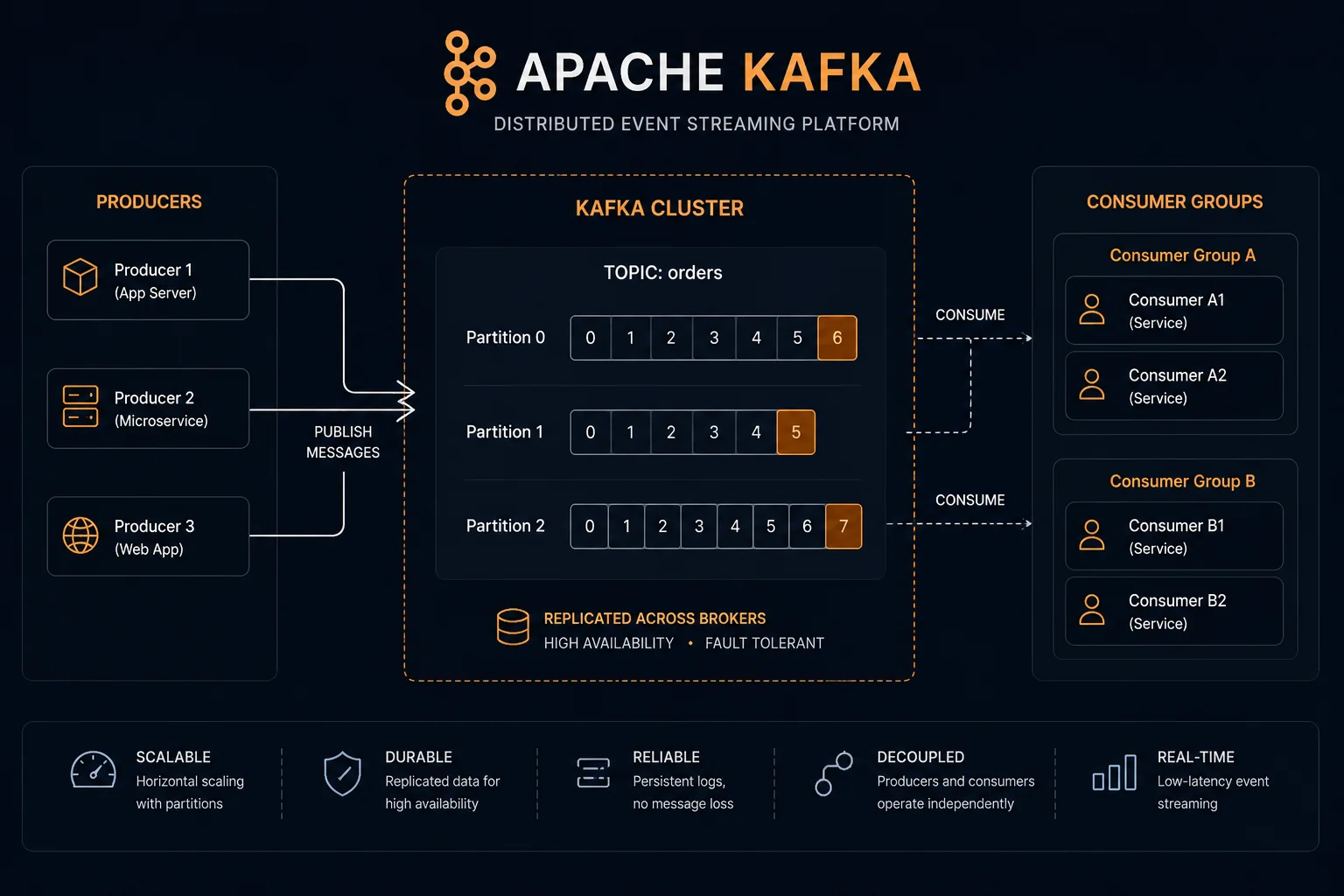
Understand why you use a message queue instead of direct service calls. The short answer: decoupling and resilience. If Service B is down when Service A tries to call it, the request fails. If Service A publishes to a queue, Service B processes it when it comes back up.
Know Kafka vs RabbitMQ at a conceptual level. Kafka is a distributed log — messages are retained and can be replayed. RabbitMQ is a traditional message broker — messages are consumed and deleted. Kafka is better for event streaming and audit logs. RabbitMQ is better for task queues and work distribution.
Consistency and Availability
This is the heart of distributed systems theory. The CAP theorem states that a distributed system can guarantee only two of three: Consistency, Availability, and Partition Tolerance. Since partition tolerance is not optional in real networks, you are always choosing between consistency and availability.
Know what eventual consistency means in practice. If you post a tweet and your follower in another region does not see it for 2 seconds, that is eventual consistency — acceptable. If you transfer money and your balance does not update immediately, that is also eventual consistency — not acceptable.
Phase 4: Practice Problems and Mock Interviews (Weeks 7–12)
The final phase is the most important: repetition and feedback.
The 30-Problem List
Practice these problems in this order. Each one teaches a different lesson:
Foundational:
- URL shortener (tinyURL)
- Rate limiter
- Key-value store
- Unique ID generator
Core systems: 5. News feed (Twitter) 6. Notification system 7. Chat system (WhatsApp) 8. Search autocomplete 9. Web crawler 10. YouTube (video upload and streaming)
Advanced: 11. Google Drive (file storage) 12. Ticketmaster (seat reservation) 13. Uber (ride-matching) 14. Amazon (e-commerce, recommendations) 15. Payment system
For each problem: spend 45 minutes designing it alone with no references, then compare your design to reference solutions from System Design Primer, Grokking the System Design Interview, or ByteByteGo. Note what you missed and what you over-complicated.
The Mock Interview Protocol
Reading and thinking through designs alone is not enough. You need to practice explaining your design out loud in 45-minute sessions, because the communication component is heavily weighted.
The protocol that works:
- Find a practice partner (a classmate, someone on BuildrHQ communities, or use AI tools for initial practice)
- One person plays interviewer, one plays candidate
- Use a shared whiteboard or drawing tool
- Interviewer asks follow-up questions to probe for depth
- Spend 10 minutes debrief after: what did the candidate do well, what did they miss
BuildrHQ's Mock Interview platform includes structured system design practice sessions with AI feedback on your architecture decisions, communication clarity, and coverage of edge cases. Practice with AI before practicing with humans — the feedback loop is much faster.
Building the Mental Framework
Experienced system designers do not memorize solutions — they apply a framework. When you walk into a system design interview, this is the mental checklist:
Step 1: Clarify requirements
- Functional: what does the system do?
- Non-functional: how many users, reads/writes per second, latency requirements, consistency requirements?
- Scale: are we designing for 1K, 1M, or 1B users?
Step 2: Estimate scale Do back-of-envelope calculations. If the system handles 10M users and each posts once a day, that is ~115 writes per second. If each post is read by an average of 200 followers, that is ~23,000 reads per second. These numbers drive your architecture choices.
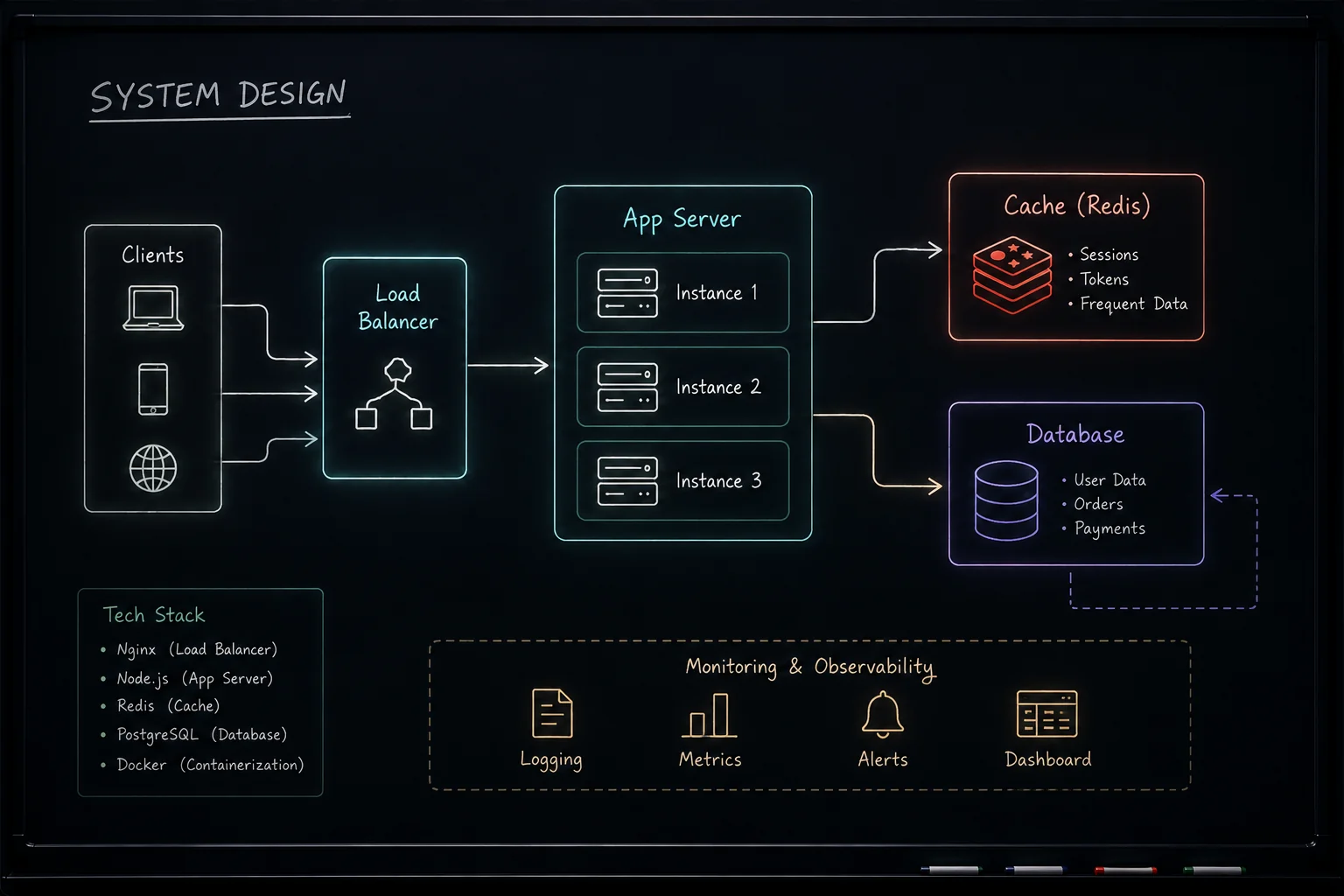
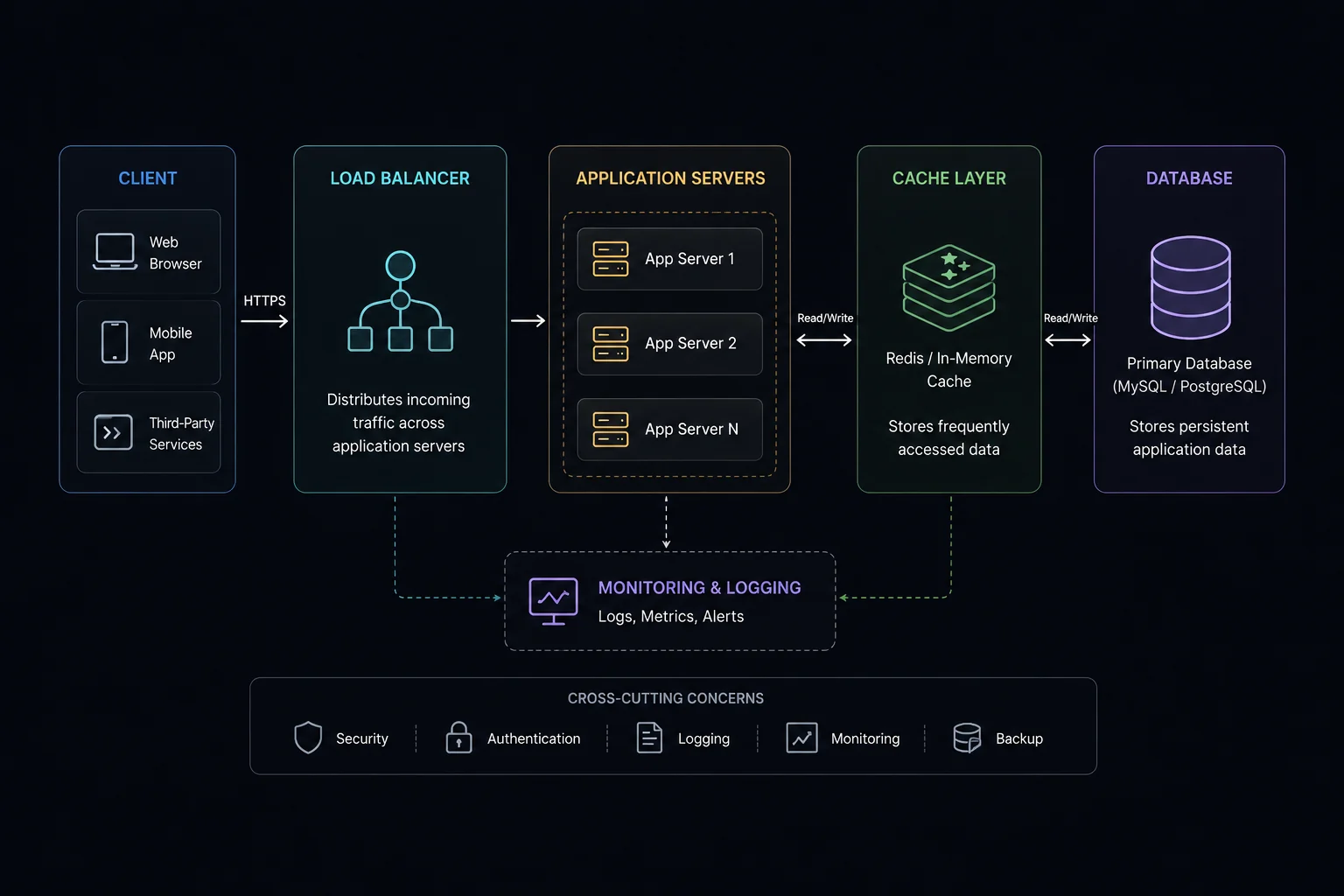
Step 3: Draw the high-level design Client → Load Balancer → Application Servers → Database. Start simple, then add complexity only where the scale numbers demand it.
Step 4: Deep dive into components Proactively identify the hardest parts of your design and explain how you would solve them. Do not wait for the interviewer to find your weaknesses.
Step 5: Identify failure modes What happens if your database goes down? What happens if your cache fails? What if a message is delivered twice? Thinking about failure modes is what separates mid-level from senior-level thinking.
Resources That Actually Help
Not all system design resources are equal. Here is what actually moves the needle:
Free:
- System Design Primer (GitHub) — the most comprehensive free resource
- ByteByteGo newsletter (free tier) — excellent visual explanations
- High Scalability blog — real-world case studies
Paid (worth it if you can afford it):
- ByteByteGo course — visual, well-structured, regularly updated
- Grokking the System Design Interview (Educative) — best for beginners, lots of practice problems
Avoid: anything that has you memorize "the answer" to common problems without explaining the reasoning. The interviewer can always ask a follow-up that breaks a memorized answer.
Timeline Reality Check
If you have zero system design knowledge: this roadmap takes 3 months of consistent 1–2 hours per day.
If you have some backend experience: 6–8 weeks of focused preparation.
If you are already working as a backend engineer: 2–4 weeks to fill gaps and practice the interview format specifically.
System design cannot be crammed. The concepts need time to settle. Start now, even if your interviews are months away. Use BuildrHQ's Pathfinder to get a structured learning path with checkpoints that keep you on track.
The developers who crack FAANG system design interviews are not smarter than you. They practiced more deliberately. Start the repetitions.